Package & Delivery Tracker
- 3.5
- Rating
- 100.00K
- Installs
- Free
- Price

 Analysis by App-foxy
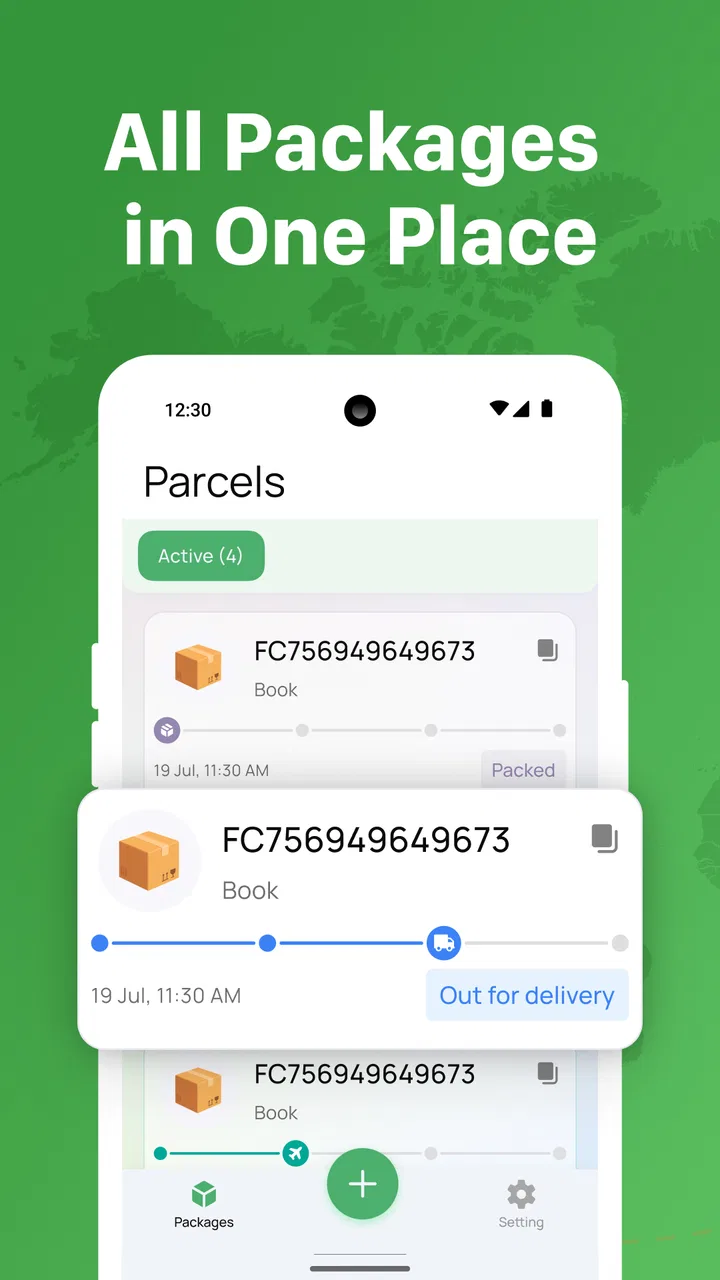
Tracking a parcel sounds simple until the delivery involves several carriers, changing handoff points, or a notification that arrives after the package has already moved. Package & Delivery Tracker is a free tools app built around that everyday problem: keeping shipment information in one place and making delivery progress easier to follow from a phone. I found its appeal less in flashy extras and more in the way it can reduce the need to jump between separate carrier pages.
The app is developed by MultiApp Dynamics OU and is aimed at general users rather than a specialist logistics audience. Its store summary focuses on real-time parcel tracking and informed delivery, while the shorter store description presents it simply as a package tracker. That straightforward positioning is useful because it sets the right expectation: this is a practical monitoring tool, not a shopping app, courier marketplace, or replacement for the carrier handling the parcel.
It is available free of charge, with optional in-app purchases priced from $7.99 to $49.99 per item. The age rating is Everyone, and the app supports devices running Android 7.0 or later. With a 3.5 average from around 3.6 thousand ratings and over 100 thousand installs, it has enough real-world use behind it to be worth examining, although the rating also suggests that the experience may not feel equally smooth for every shipment or every phone.
You May Also Like

 Blood Strike: 2.5 Anniversary
Blood Strike’s Loadouts Turn Every Drop Into a Tactical Gamble
A close look at Blood Strike’s custom loadouts: how fast access to signature weapons reshapes its battle royale rhythm, rewards preparation, and narrows the gap between fights.

 Pandora - Music & Podcasts
Pandora’s Music Is Easy to Start, but Harder to Recover
Pandora’s strength is its low-effort path from a seed to a station. Its weak spot is how much confidence it asks you to place in connection, setup, and quiet recovery.

 8 Ball Pool
 Is Built on Rivalries, Rematches, and Routine
A close look at the rivalries, rematches, shared routines, and unanswered safety questions that turn a quick pool match into a persistent mobile community.

 Samsung Music
’s Quiet Strength Is Playing What You Already Own
Its reach comes less from spectacle than from dependable access to a personal library. That simplicity is both the app’s strongest retention engine and its ceiling.

 AccuWeather: Weather Radar
AccuWeather Review: A Quick, Clear Forecast for Everyday Decisions
For everyday plans, the best forecast is the one you can understand quickly. AccuWeather makes rain timing, radar, and local conditions easy to act on, with a few trade-offs.

 Hill Climb Racing
Why Hill Climb Racing Still Turns Crashes Into One More Run
A tiny car, a bumpy hill and one more upgrade: Hill Climb Racing keeps resurfacing because its simple chaos makes every near-miss feel personal.
More From Our News Desk



How Package & Delivery Tracker feels when connectivity matters
I find the connection question most useful when I’m deciding whether a quiet tracking screen calls for action or simply patience. This section looks at how I’d separate a network hiccup from a delayed carrier update, and why a sensible check-in routine can make the app more helpful without turning every pause into a problem.
The useful part happens when the network is available
Parcel tracking is naturally dependent on communication between the app, tracking services, and the carrier systems behind a shipment. In practical terms, the app is most valuable when I have a connection and want to check whether a parcel has moved, reached a delivery stage, or is still waiting for a new scan. The important distinction is that the app can present tracking information conveniently, but it cannot make a carrier produce an update that has not yet been recorded.
That limitation is easy to overlook when a shipment appears stuck. A quiet tracking timeline does not automatically mean the app is broken or that the parcel is lost. It may simply mean that the next carrier event has not reached the service yet. I would treat the app as a clear window onto available delivery information, not as an independent source of physical location data.
This makes connection quality part of the experience. On a strong mobile connection, checking a shipment while leaving a shop or walking toward a pickup point is a natural use case. In a weak-signal area, the same action can become frustrating because the information you want depends on a successful refresh. I would avoid making an important delivery decision based on a screen that has not visibly updated during a poor connection.
There is also a useful habit here: check the last known event before reacting to a delay. If the most recent entry already shows that the parcel is waiting for a handoff, the sensible next step may be patience rather than repeatedly refreshing. Repeated checks do not speed up carrier processing, and they can turn a helpful utility into a source of unnecessary worry.
A realistic day-to-day delivery scenario
Imagine ordering a replacement charger for a laptop and needing it before leaving home for work. Instead of searching through old emails, opening individual carrier pages, and trying to remember which tracking number belongs to which order, I would use the tracker as a central place to review the shipment. A quick check before breakfast could tell me whether the parcel is still moving or whether I should make another arrangement.
The benefit becomes clearer when several deliveries overlap. A household may have a subscription order, a personal purchase, and a gift arriving close together. The practical challenge is not merely finding a tracking number; it is remembering which delivery matters today. A consolidated tracker can make that mental load smaller, especially for people who buy from different retailers and do not want every delivery conversation tied to a separate website.
Connectivity still shapes this scenario. If I check while connected at home, I can make a plan with the most current information available. If I later look again in a basement, underground station, or crowded event venue, I would regard the displayed status cautiously until the app can communicate properly again. That is a small but important distinction for anyone expecting minute-by-minute certainty.
Mobile use is the strongest reason to try it
The app makes the most sense for people who manage deliveries away from a desk. A phone is already present when I am commuting, shopping, working from a shared office, or waiting for a courier at a building entrance. Having parcel information in a mobile tool is more convenient than relying on a laptop browser, particularly when I need to check a status quickly rather than investigate a complicated delivery issue.
For mobile use, the best workflow is to check before the moment becomes urgent. If I am deciding whether to stay home, ask a neighbor for help, or leave instructions for a delivery, I would review the latest status while I have a dependable connection. Waiting until the courier is supposedly nearby creates a poor experience if the network is weak or the carrier has not posted a fresh scan.
I also think the app suits people who want a lightweight routine. A morning check for important parcels and a second check later in the day is more sensible than opening it every few minutes. That approach saves attention and avoids confusing a normal gap between carrier scans with a technical problem.
Android compatibility is reasonably broad because the minimum requirement is Android 7.0. That matters for users keeping an older phone in service as a backup or using a budget handset rather than a recent flagship. The current version is 1.0.9, so I would keep the app updated through the normal app store process, especially if a shipment is important and the phone has not been updated recently.
What to do when a status does not change
The most common failure point in a parcel tracker is not necessarily the interface. It is the gap between a physical event and the digital scan that reports it. A package can be moving while the visible status remains unchanged, or a carrier can process an item without immediately exposing the event to every tracking service. I would therefore separate three questions: is the phone connected, has the app refreshed, and has the carrier actually published a new event?
That simple checklist prevents a lot of wasted effort. First, try again from a reliable connection rather than assuming the shipment itself has changed. Next, compare the timing of the last event with the delivery expectation shown elsewhere in the order information. If the same status persists beyond a reasonable period, checking the carrier directly may be better than repeatedly using the tracker.
This is one of the situations where the usual alternative can be stronger. A carrier’s own tracking page or app may expose service-specific explanations, delivery instructions, or contact options that a general tracker cannot provide. Package & Delivery Tracker is more attractive for centralizing routine checks; the carrier remains the better destination when a parcel needs intervention.
Recovery after a failed check should also be calm and deliberate. I would not assume that an error means the tracking number is invalid, nor would I immediately remove and re-add a shipment. A temporary connection problem, a delayed carrier response, or an incomplete update can all look similar from the user’s side. Give the app a clean opportunity to reconnect, then use the carrier’s own channel if the delivery is time-sensitive.
Data-conscious habits make the app easier to live with
Because the experience revolves around current shipment information, users should think about when they need updates rather than treating tracking as a constant live feed. Checking only when there is a meaningful decision to make is a sensible mobile habit. It reduces needless refreshes and keeps parcel monitoring from consuming attention throughout the day.
I would also be selective about which shipments deserve frequent checking. A low-value household item can usually wait for a normal update, while medication, a time-sensitive replacement, or a gift for a fixed occasion may justify closer monitoring. This prioritization is more useful than expecting every parcel to receive the same level of attention.
The free entry point makes experimentation easy, but the in-app purchase range deserves a careful look before spending money. Since the app can be tried without an upfront charge, I would first confirm that its tracking workflow fits my usual deliveries and that the information arrives in a useful form. Optional purchases should solve a clear need for the individual user, not become an automatic expense simply because the app is convenient.
That is particularly important for occasional shoppers. Someone who receives only a few parcels each year may get enough value from the free experience, while a frequent online buyer may be more willing to consider paid options if they genuinely reduce daily effort. I would judge that decision by repeated usefulness, not by the number of tracking checks I can perform in a single afternoon.
Where it beats separate carrier tools, and where it does not
The main alternative is to use each carrier’s own website or app. That route can be more authoritative for a specific shipment and may offer carrier-specific actions, but it becomes awkward when deliveries come from several providers. Package & Delivery Tracker has a clearer advantage in that mixed-carrier situation: one mobile destination can be easier to remember than a collection of bookmarks, emails, and retailer order pages.
Retailer order pages are another alternative. They are useful for seeing the purchase context, such as what was ordered and which seller handled it, but they are not always the most convenient place for ongoing delivery checks. A dedicated tracker focuses attention on the parcel itself. The trade-off is that a general tracker may not explain every exception as deeply as the retailer or carrier that owns the order.
Email notifications also remain perfectly adequate for people who receive only occasional deliveries. If a message already tells me when a parcel is dispatched and delivered, adding another app may offer little improvement. The tracker becomes more worthwhile when email is scattered across accounts, several parcels overlap, or I want a consistent mobile routine instead of searching through messages.
In my view, the app occupies a useful middle ground. It is more organized than relying on inbox searches, but less specialized than a carrier’s own service. That makes the choice depend on the problem I am trying to solve. For consolidation, it is promising. For changing an address, resolving a failed delivery, or asking a carrier to investigate, I would move to the official channel.
Who should use it and who should skip it
I would recommend trying Package & Delivery Tracker if you regularly receive parcels from different sources and want a single mobile place to check them. It is also a reasonable fit for households where several people are waiting on deliveries, or for anyone who spends much of the day away from a computer and wants quick access to shipment progress.
It may be especially useful for people who tend to lose tracking emails. A dedicated tool can create a more deliberate habit: add the shipment when it matters, check it at sensible times, and switch to the carrier when the parcel needs a solution rather than another status view. That workflow is more valuable than simply having another notification surface.
I would skip it if I only track one carrier, receive very few packages, or already find the retailer and carrier apps completely satisfactory. I would also avoid depending on it as the sole authority for a high-stakes delivery. The network-dependent nature of tracking and the possibility of delayed scans mean that important exceptions deserve confirmation through the service actually responsible for the parcel.
The 3.5 average is a useful reminder to keep expectations practical. This is a utility whose success depends partly on external delivery systems, so a smooth experience is not guaranteed for every route or shipment. The app can organize information well and still feel limited when the underlying carrier data is late, incomplete, or difficult to interpret.
My connectivity verdict
After looking at the app as a daily mobile tool, I see its strongest quality in convenience rather than technical spectacle. It gives parcel monitoring a focused home and can make mixed deliveries easier to follow. The experience is at its best when I have a stable connection, several shipments to manage, and no need for carrier-specific intervention.
The most important tip is to use it as a planning aid, not a promise of constant precision. Check before making delivery decisions, distinguish a stale carrier scan from a failed connection, and move to the official carrier service when a parcel needs action. Those habits make the app more useful and prevent ordinary network or reporting delays from becoming unnecessary alarm.
For a free tools app with broad Android compatibility, Package & Delivery Tracker is worth testing if delivery organization is a recurring nuisance. I would keep the optional purchases in perspective and judge the app over several real shipments, not one unusually smooth or unusually delayed order. My recommendation is cautious but positive: use it for consolidation and convenience, while keeping the carrier’s own service as the final authority.
MultiApp Dynamics OU has chosen a practical problem with a clear mobile solution. The app will not remove every uncertainty from parcel delivery, and connectivity remains central to what it can show, but it can reduce the friction of checking multiple shipments. For the right user, that small reduction in daily searching is exactly what makes a tracking tool worth keeping.
FAQs for Package & Delivery Tracker
01What is Package & Delivery Tracker used for?
Package & Delivery Tracker is designed to help you monitor parcels from different shipping companies in one place. After entering a tracking number, the app can display shipment progress, recent scans, estimated delivery information, and status changes. It is useful for online shoppers, frequent senders, and anyone managing several deliveries without repeatedly visiting individual courier websites.
02Which couriers and tracking numbers are supported?
Support can vary depending on the app version, region, and the courier database it uses. Package & Delivery Tracker is generally intended to recognize tracking numbers from many major postal services and private delivery companies, but not every carrier or shipment type is guaranteed to work. If a number is not recognized, checking the courier’s official website may provide better results.
03How do I add a package to the tracker?
To add a delivery, open the tracking section and enter or paste the parcel’s tracking number. Some versions may also allow you to select a courier manually, scan a barcode, or use automatic detection. Once saved, the package should appear in your shipment list, where you can review updates and remove old deliveries when they are no longer needed.
04Does Package & Delivery Tracker provide real-time delivery updates?
The app can display tracking events when new information is received from the relevant carrier, but updates are not always truly real time. Shipping companies may delay scans, restrict access to tracking data, or update their systems at different intervals. Delivery estimates can also change because of weather, customs, weekends, incorrect addresses, or other transportation problems.
05Is Package & Delivery Tracker free and is my tracking information safe?
The basic tracking features may be available without payment, although some versions can include advertisements, optional premium tools, or subscription features. Before downloading, review the current store listing for pricing and in-app purchases. You should also check the privacy policy to understand how tracking numbers and notification data are stored, processed, and potentially shared.
Pros
- Tracks packages from multiple carriers in one place.
- Provides timely delivery status updates and notifications.
- Supports tracking for both domestic and international shipments.
- Simple interface makes shipment details easy to find.
- Useful for monitoring several orders at the same time.
Cons
- Carrier support and tracking accuracy may vary by country.
- Some features may require a premium subscription.
- Updates can be delayed when carriers refresh their systems.
- Ads may appear in the free version.
- International shipments may show limited customs information.

Package & Delivery Tracker
Gallery